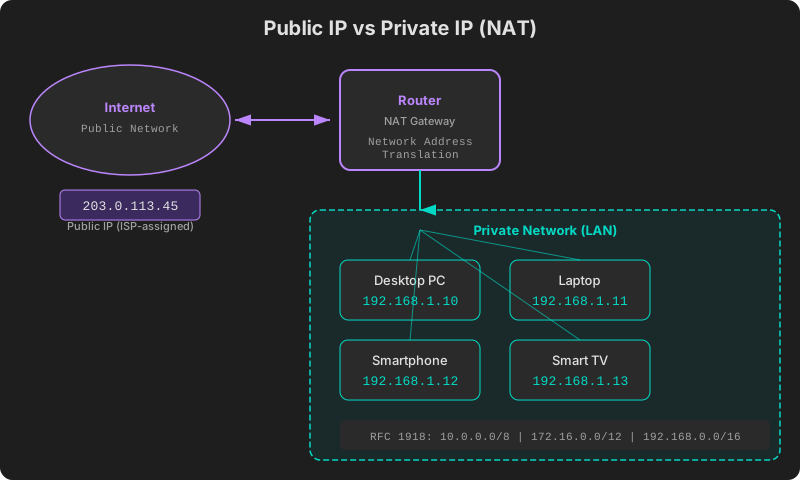
Public IP vs Private IP: Differences and How to Check
Public IP vs Private IP: Differences and How to Check
Have you ever wondered how multiple devices in your home can access the internet simultaneously through a single connection? The answer lies in the distinction between public IP and private IP addresses, and the NAT technology that bridges them. This guide explains what each type of IP address is, why they exist, and how you can check your own.
What Is a Public IP?
A public IP address is a globally unique identifier on the internet. It is assigned by your ISP (Internet Service Provider) and allows your network to communicate directly with any server on the internet.
Key characteristics of public IPs:
- Globally unique — no two devices on the internet share the same public IP at the same time.
- Directly reachable from the internet — required for hosting web servers or services.
- Managed by your ISP — you cannot arbitrarily choose your own public IP.
- Visible to external services — when you visit a website, the server sees your public IP.
Examples: 203.0.113.45, 121.134.56.78
What Is a Private IP?
A private IP address is valid only within a local area network (LAN). Your smartphone, laptop, tablet, and smart TV on your home Wi-Fi each have a unique private IP, but these addresses are meaningless outside your network.
Key characteristics of private IPs:
- Valid only within the local network.
- Not directly accessible from the internet.
- Can overlap across different networks — your neighbor can use
192.168.1.10too. - Assigned by your router, typically via DHCP.
Examples: 192.168.1.10, 10.0.0.5, 172.16.0.100
RFC 1918 Private IP Ranges
The address ranges reserved for private use are defined by the RFC 1918 standard. These addresses are never routed on the public internet, so anyone can use them freely within their local network.
| Range | Start | End | CIDR | Addresses | Typical Use |
|---|---|---|---|---|---|
| Class A | 10.0.0.0 | 10.255.255.255 | 10.0.0.0/8 | ~16.7 million | Large enterprises |
| Class B | 172.16.0.0 | 172.31.255.255 | 172.16.0.0/12 | ~1 million | Medium networks |
| Class C | 192.168.0.0 | 192.168.255.255 | 192.168.0.0/16 | ~65,000 | Home / small office |
Home routers typically use the 192.168.0.0/16 or 192.168.1.0/24 range. Enterprises and large organizations tend to use the 10.0.0.0/8 range.
Additionally, the 169.254.0.0/16 range is reserved for link-local addresses. A device assigns itself an address in this range when it cannot obtain one from a DHCP server — if you see this, it usually signals a network configuration problem.
How NAT (Network Address Translation) Works
NAT is the essential technology that connects private IPs to the public internet. Your router translates private IP addresses into its single public IP, enabling all your devices to share one internet connection.
The NAT Process
- A device on your network (
192.168.1.10) sends a request to a website. - The router replaces the source address with its public IP (
203.0.113.45). - The router records the mapping in a translation table, noting which internal device made which request.
- The website’s response arrives at the public IP.
- The router consults the translation table and forwards the response to the correct internal device.
Types of NAT
- Static NAT: Maps one private IP to one public IP in a fixed 1:1 relationship. Used for servers.
- Dynamic NAT: Assigns private IPs to public IPs from an available pool on demand.
- PAT (Port Address Translation): Multiple devices share a single public IP, distinguished by port numbers. This is what home routers use. Also called NAPT or IP masquerading.
The method used in virtually every home network is PAT. It is the reason dozens of devices can use the internet through a single public IP.
CGNAT: Your ISP’s Extra Layer of NAT
CGNAT (Carrier-Grade NAT) is a large-scale NAT deployed by ISPs to cope with IPv4 address scarcity. While standard NAT operates on your home router, CGNAT adds another translation layer at the ISP network level.
Under CGNAT:
- Your “public IP” may actually be a shared address within the ISP’s internal network.
- NAT is applied twice — once at your router, once at the ISP.
- Inbound connections are difficult or impossible (no port forwarding).
- The
100.64.0.0/10range is reserved specifically for CGNAT (RFC 6598).
CGNAT is common on mobile networks (LTE/5G) worldwide and is increasingly used on some wired broadband connections as well.
How to Check Your IP Address
Checking Your Public IP
Your public IP can only be determined by an external service. The simplest method is to visit ip.utilo.kr in your web browser. You will instantly see your public IP, location data, and ISP information.
You can also check from the command line:
curl ifconfig.me
curl ip.utilo.kr/api/ip
Checking Your Private IP
Your private IP is found in your operating system’s network settings:
Windows:
ipconfigmacOS / Linux:
ifconfig
# or
ip addr show
Smartphone: Settings → Wi-Fi → tap the connected network for details.
Static IP vs Dynamic IP
Beyond the public/private distinction, IP addresses also differ in how they are assigned.
Static IP:
- Permanently assigned to a device; does not change
- Used for servers, network equipment, and services that need a consistent address
- Typically costs extra from your ISP
Dynamic IP:
- Automatically assigned by DHCP; may change periodically
- Standard for residential internet connections
- Allows efficient reuse of IP addresses
Most home internet connections use dynamic IPs, which means your public IP today might differ from yesterday’s. To see your current IP, visit ip.utilo.kr.
Summary Comparison
| Public IP | Private IP | |
|---|---|---|
| Scope | Entire internet | Local network only |
| Uniqueness | Globally unique | Unique within network |
| Assigned by | ISP | Router (DHCP) |
| Direct access | Yes | No (requires NAT) |
| Cost | Included in ISP plan | Free |
| Example | 203.0.113.45 | 192.168.1.10 |
For a broader introduction to IP addresses, see Complete Guide to IP Addresses. To learn how VPNs change the IP that others see, check out VPN Detection Methods.