VPN Detection Methods: How Websites Know You're Using a VPN
VPN Detection Methods: How Websites Know You’re Using a VPN
VPNs (Virtual Private Networks) are powerful tools for online privacy. Yet many websites and services can detect — and sometimes block — VPN connections. If you have ever seen a message like “It looks like you’re using a proxy” on Netflix, you have already experienced VPN detection in action.
This guide explains why VPN detection matters, what technologies make it possible, and where those technologies fall short.
Why Detect VPN Usage?
Service providers have several reasons to identify VPN connections:
- Content licensing: Streaming services hold region-specific licenses. Accessing content from another country via VPN violates those agreements.
- Fraud prevention: In financial services, a VPN connection can signal a fraudulent transaction. A mismatch between a user’s known location and their IP location triggers additional verification.
- Price arbitrage prevention: Some users use VPNs to access region-specific pricing — companies want to prevent this.
- Regulatory compliance: Online gambling, certain types of content, and other services face country-specific legal requirements.
- Bot and scraping defense: VPNs and proxies are frequently used in automated attacks and data scraping.
Method 1: IP Database Lookup
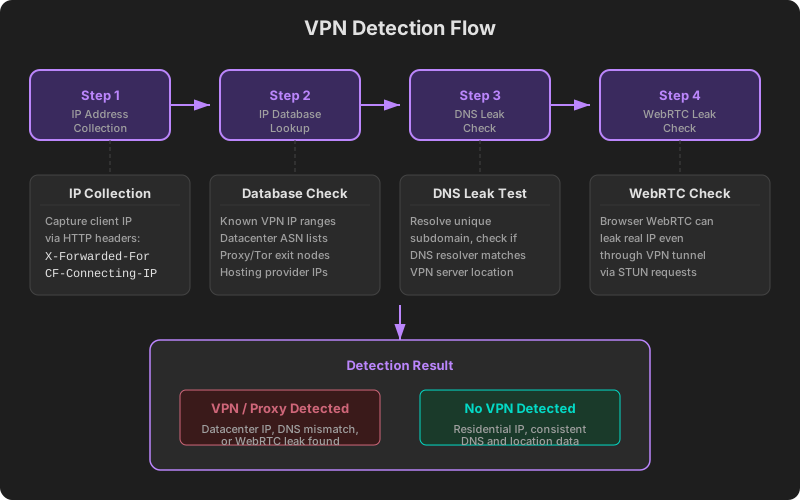
The most fundamental and effective method relies on IP address databases.
How It Works
Specialized providers (MaxMind, IP2Location, IPinfo, etc.) maintain databases that classify every IP address by type:
- Residential: Assigned by consumer ISPs to home users
- Datacenter / Hosting: Belonging to AWS, Google Cloud, DigitalOcean, and similar providers
- VPN / Proxy: Known IP ranges operated by VPN services
- Tor exit nodes: IPs associated with the Tor network’s exit relays
Classification Example
Connecting IP: 185.199.108.100
→ Database lookup
→ ASN: AS13335 (Cloudflare)
→ Type: Datacenter / CDN
→ Verdict: Likely VPN or proxy
Regular users connect through ISPs like Comcast, AT&T, or BT. VPN users, however, typically route through datacenter IPs. This distinction is the primary detection signal.
ASN (Autonomous System Number) Analysis
Every IP address belongs to a specific ASN. The ASNs used by VPN services are distinctly different from those of consumer ISPs. Traffic originating from a hosting company’s ASN is highly likely to be passing through a VPN or proxy.
Method 2: DNS Leak Detection
A DNS leak occurs when DNS queries escape the VPN tunnel and travel through the user’s regular internet connection. This can be leveraged in reverse to detect VPN usage.
How It Works
- A website triggers a DNS request for a unique subdomain (e.g.,
abc123.check.example.com). - Only the website’s authoritative DNS server can respond to this subdomain.
- The server logs which DNS resolver sent the query.
- It compares whether the resolver’s location matches the IP’s GeoIP location.
Detection Scenarios
| Scenario | IP Location | DNS Resolver Location | Verdict |
|---|---|---|---|
| Normal browsing | New York | New York (ISP DNS) | Normal |
| VPN with DNS leak | Germany | New York (ISP DNS) | VPN suspected |
| VPN without leak | Germany | Germany | Hard to determine |
When the DNS resolver’s location significantly differs from the IP’s GeoIP location, VPN usage is likely.
Method 3: WebRTC Leak Detection
WebRTC (Web Real-Time Communication) is a browser technology for real-time peer-to-peer communication, but it can inadvertently expose a VPN user’s real IP address.
How It Works
WebRTC sends requests to STUN (Session Traversal Utilities for NAT) servers to establish P2P connections. During this process, the browser gathers both local and public IP addresses — and the real public IP may bypass the VPN tunnel.
// Information potentially exposed via WebRTC
{
  "vpn_ip": "104.238.170.50",      // VPN server IP
  "real_ip": "121.134.56.78",      // Actual public IP (leaked!)
  "local_ip": "192.168.1.10"       // Private IP
}
Detection Logic
A website can use JavaScript to access the WebRTC API and:
- Gather ICE candidates via a STUN server.
- Check whether any collected public IP differs from the IP used for the HTTP connection.
- If two distinct public IPs are found, flag the connection as using a VPN.
Most modern VPN clients prevent WebRTC leaks, but browser-extension-based VPNs or misconfigured setups can still be vulnerable.
Method 4: Latency Analysis
Network latency patterns can also suggest VPN usage.
The Principle
VPN connections route data through an additional server, adding latency. If an IP’s GeoIP location says “United States” but the round-trip time to a US-based server is only 10ms, the user is likely connecting from nearby through a VPN — not genuinely located in the US.
| Metric | Normal Connection | VPN Connection |
|---|---|---|
| IP → Server ping | Proportional to distance | Unusually short or long |
| TCP handshake time | Stable | Variable |
| GeoIP location vs actual latency | Consistent | Inconsistent |
This method is not highly accurate on its own but serves as a valuable secondary signal when combined with other techniques.
Datacenter IPs vs Residential IPs
The central distinction in VPN detection is whether an IP belongs to a datacenter or a residential network.
Datacenter IP characteristics:
- Registered to cloud providers like AWS, Azure, GCP, or DigitalOcean
- Rarely used by ordinary consumers directly
- Commonly associated with VPNs, proxies, and bots
- Large blocks often share the same subnet
Residential IP characteristics:
- Registered to consumer ISPs like Comcast, AT&T, BT, or Deutsche Telekom
- Assigned to homes for everyday internet use
- GeoIP location data tends to be relatively accurate
A growing challenge is the emergence of residential proxy services, which route traffic through actual home internet connections. These bypass datacenter-based detection, driving the evolution of more sophisticated detection methods.
Limitations of VPN Detection
No detection technology is perfect:
- False positives: Corporate VPN users, satellite internet subscribers, and travelers may be incorrectly flagged.
- False negatives: Residential proxies, well-configured VPNs, and newly provisioned VPN server IPs can evade detection.
- Privacy concerns: Aggressive detection techniques can infringe on user privacy.
- Constant maintenance: As VPN services acquire new IP ranges, databases must be continuously updated.
Check Your IP’s VPN Detection Status
Curious whether your current IP address is flagged as a VPN or proxy? Visit ip.utilo.kr to find out instantly. You will see your IP’s VPN/proxy detection status, datacenter classification, and ASN information at a glance.
For DNS-related queries, try the DNS lookup tool. For foundational knowledge about IP addresses, see Complete Guide to IP Addresses. To understand public and private IP differences, read Public vs Private IP.