Complete Guide to IP Addresses: IPv4, IPv6, and GeoIP
Complete Guide to IP Addresses: IPv4, IPv6, and GeoIP
You have probably encountered the term “IP address” countless times while using the internet. But what exactly is an IP address, how is it structured, and why does it matter? This guide covers everything from the fundamentals of IP addressing to the differences between IPv4 and IPv6, and how GeoIP technology works.
What Is an IP Address?
An IP (Internet Protocol) address is a unique numerical identifier assigned to every device connected to the internet. Just as a postal address directs mail to your home, an IP address ensures that data packets reach the correct device on the network.
IP addresses are a core component of the Internet Protocol, the set of rules governing how data is transmitted across networks. Whether you are browsing a website, sending an email, or streaming video, IP addresses are at work behind every connection.
There are two major versions of IP addresses in use today: IPv4 and IPv6.
IPv4 Structure: The 32-Bit Address System
IPv4 (Internet Protocol version 4) was introduced in 1981 and remains the most widely used addressing system on the internet.
Basic Structure
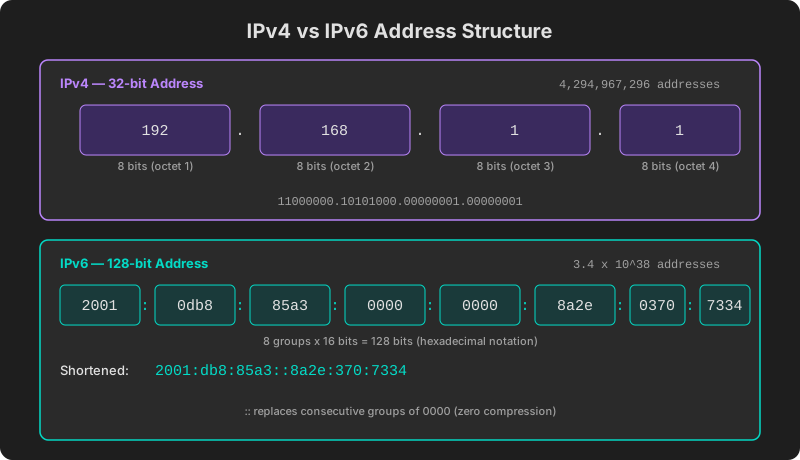
An IPv4 address consists of 32 bits (4 bytes), divided into four octets separated by dots — a format known as dotted decimal notation.
192.168.1.1Each octet represents 8 bits converted to a decimal number, ranging from 0 to 255.
| Component | Value | Binary |
|---|---|---|
| Octet 1 | 192 | 11000000 |
| Octet 2 | 168 | 10101000 |
| Octet 3 | 1 | 00000001 |
| Octet 4 | 1 | 00000001 |
Address Space Limitations
With 32 bits, IPv4 can represent 2^32 = approximately 4.3 billion addresses. While that seemed ample in the early days of the internet, the explosive growth of smartphones, IoT devices, and cloud services has exhausted the available pool. IANA (Internet Assigned Numbers Authority) allocated the last IPv4 address blocks in 2011.
Address Classes and Ranges
IPv4 addresses were traditionally organized into classes (A through E):
- Class A (
1.0.0.0–126.255.255.255): Large-scale networks - Class B (
128.0.0.0–191.255.255.255): Medium-scale networks - Class C (
192.0.0.0–223.255.255.255): Small-scale networks
Today, CIDR (Classless Inter-Domain Routing) has largely replaced the class-based system, enabling more flexible address allocation.
IPv6 Structure: The 128-Bit Address System
IPv6 (Internet Protocol version 6) was designed to fundamentally solve IPv4’s address exhaustion problem.
Basic Structure
An IPv6 address consists of 128 bits (16 bytes), written as eight groups of 16 bits separated by colons, using hexadecimal notation.
2001:0db8:85a3:0000:0000:8a2e:0370:7334Shorthand Notation
Because IPv6 addresses are long, two abbreviation rules are available:
-
Leading zero suppression: Drop leading zeros within each group.
0db8becomesdb80000becomes0
-
Zero group compression: Replace one consecutive run of all-zero groups with
::.2001:0db8:85a3:0000:0000:8a2e:0370:7334- becomes
2001:db8:85a3::8a2e:370:7334
Address Space
With 128 bits, IPv6 offers 2^128 = roughly 3.4 x 10^38 addresses — enough to assign hundreds of trillions of addresses to every square meter of Earth’s surface. Address exhaustion is effectively a non-issue.
Additional Benefits of IPv6
- No NAT required: Sufficient address space to assign a public address to every device
- Built-in security: IPsec is a mandatory part of the protocol
- Efficient routing: Simplified header structure improves processing speed
- Auto-configuration: Supports SLAAC (Stateless Address Autoconfiguration)
Public IP vs Private IP
IP addresses are categorized by scope into public IPs and private IPs.
A public IP is a globally unique address reachable from anywhere on the internet. Your ISP (Internet Service Provider) assigns it, and it is the address that websites and external services see when you connect.
A private IP is used only within a local network, such as your home or office. A router’s NAT (Network Address Translation) allows multiple devices to share a single public IP.
For a deeper dive into this topic, see Public vs Private IP: Differences and How to Check.
GeoIP Technology: Estimating Location from IP
GeoIP is a technology that estimates the approximate geographic location of a device based on its IP address. While not perfectly accurate, it serves many practical purposes.
How GeoIP Works
- IP allocation databases: Leveraging records from IANA and Regional Internet Registries (RIRs)
- ISP mapping: Connecting IP ranges to ISPs and their service regions
- Network path analysis: Using traceroute data for location triangulation
- User data calibration: Improving accuracy with real-world user data
GeoIP Use Cases
- Content localization: Serving the right language and content based on user location
- Geo-targeted advertising: Targeting ads to specific regions
- Security and fraud prevention: Detecting unusual access locations
- Regulatory compliance: Enforcing regional content restrictions (e.g., copyright geo-blocking)
- Analytics: Understanding the geographic distribution of website visitors
GeoIP Limitations
GeoIP is not infallible. VPNs and proxies can mask a user’s true location, and mobile networks may show the location of a cell tower rather than the user. City-level accuracy is typically around 80–90%, and pinpointing a specific street address is not possible.
To learn more about how VPNs affect GeoIP results, see VPN Detection Methods.
Check Your IP Address
If you are curious about your public IP address, you can find it instantly without installing any software.
At ip.utilo.kr, you can view your current IP address along with GeoIP location data, ISP information, AS number, and VPN/proxy detection status — all in one place. Both IPv4 and IPv6 are fully supported, and a DNS lookup tool is also available.
Check your IP address now and explore the full details of your connection.