The Complete Guide to CIDR Notation and Subnet Calculation
The Complete Guide to CIDR Notation and Subnet Calculation
If you’ve ever configured a firewall rule, set up a VPC, or managed a server, you’ve encountered notation like 192.168.1.0/24 or 10.0.0.0/8. This is CIDR (Classless Inter-Domain Routing) notation — the standard way to describe IP address ranges. Understanding CIDR is essential for network design, security configuration, and cloud infrastructure management.
This guide covers CIDR from its historical origins through practical subnet calculations, with reference tables and worked examples.
Classful vs. Classless: Why CIDR Exists
The Classful Era (1981–1993)
In the early internet, IP addresses were allocated in fixed classes:
| Class | Leading Bits | Network Bits | Range | Hosts |
|---|---|---|---|---|
| A | 0 | 8 | 1.0.0.0 – 126.0.0.0 | 16,777,214 |
| B | 10 | 16 | 128.0.0.0 – 191.255.0.0 | 65,534 |
| C | 110 | 24 | 192.0.0.0 – 223.255.255.0 | 254 |
The problem was obvious. An organization needing 500 hosts couldn’t use a Class C (254 hosts) but would waste most of a Class B (65,534 hosts). This rigid allocation scheme accelerated IPv4 address exhaustion.
The CIDR Revolution (1993–Present)
RFC 1518 and RFC 1519 introduced CIDR in 1993, abolishing class boundaries. Instead of fixed allocations, CIDR uses a prefix length to specify exactly how many addresses are needed:
# Classful: Class C = always 256 addresses
192.168.1.0 (Class C)

# CIDR: flexible allocation
192.168.1.0/25  → 128 addresses
192.168.1.0/26  → 64 addresses
192.168.1.0/28  → 16 addresses
CIDR also enabled route aggregation (supernetting), dramatically reducing the size of global routing tables.
Understanding Prefix Length
The number after the slash (/) in CIDR notation represents the number of bits in the network portion of the address. Since IPv4 addresses are 32 bits total, the remaining bits identify individual hosts.
192.168.1.0/24

IP address:    11000000.10101000.00000001.00000000
Subnet mask:   11111111.11111111.11111111.00000000
               ←── network (24 bits) ──→←host (8)→

Total addresses: 2^8 = 256
Usable hosts:   256 - 2 = 254 (subtract network and broadcast)
Key formulas:
- Total addresses = 2^(32 - prefix length)
- Usable hosts = Total addresses - 2
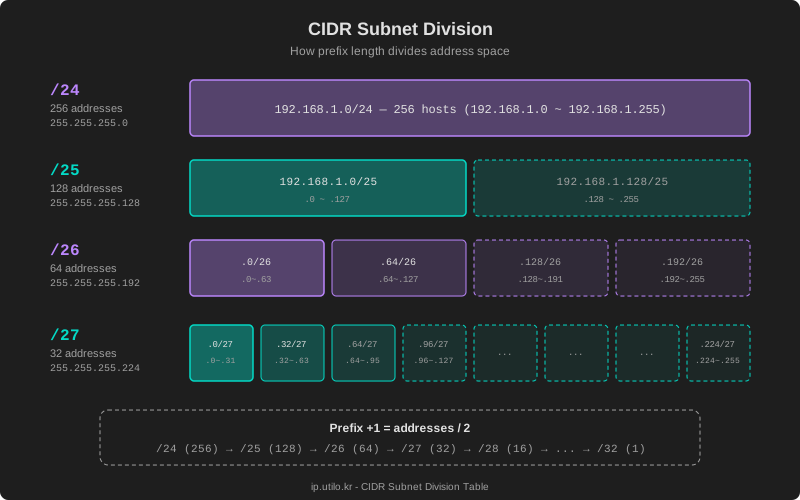
Every increment of 1 in the prefix length halves the address space.
Subnet Mask ↔ CIDR Reference Table
This is the table you’ll reference most often in practice:
| CIDR | Subnet Mask | Total Addresses | Usable Hosts | Common Use |
|---|---|---|---|---|
/32 | 255.255.255.255 | 1 | 1 | Single host route |
/31 | 255.255.255.254 | 2 | 2* | Point-to-point link |
/30 | 255.255.255.252 | 4 | 2 | Point-to-point link |
/29 | 255.255.255.248 | 8 | 6 | Small subnet |
/28 | 255.255.255.240 | 16 | 14 | Small LAN |
/27 | 255.255.255.224 | 32 | 30 | Small office |
/26 | 255.255.255.192 | 64 | 62 | Medium LAN |
/25 | 255.255.255.128 | 128 | 126 | Medium network |
/24 | 255.255.255.0 | 256 | 254 | Standard LAN |
/23 | 255.255.254.0 | 512 | 510 | Large LAN |
/22 | 255.255.252.0 | 1,024 | 1,022 | Campus network |
/21 | 255.255.248.0 | 2,048 | 2,046 | Large subnet |
/20 | 255.255.240.0 | 4,096 | 4,094 | ISP allocation |
/16 | 255.255.0.0 | 65,536 | 65,534 | Enterprise/ISP |
/8 | 255.0.0.0 | 16,777,216 | 16,777,214 | Mega network |
*/31 subnets use both addresses per RFC 3021 — no network or broadcast address is reserved.
Calculating Network Address, Broadcast, and Host Range
The core of subnet math involves finding three values for any given IP and prefix length.
Worked Example
Let’s calculate the subnet details for 192.168.1.130/26.
Step 1: Determine the block size
/26 → Host bits = 32 - 26 = 6
Block size = 2^6 = 64
Step 2: Find the network address
Divide the last octet by the block size and round down:
130 ÷ 64 = 2.03... → 2 × 64 = 128
Network address: 192.168.1.128
Step 3: Find the broadcast address
Network address + block size - 1:
128 + 64 - 1 = 191
Broadcast address: 192.168.1.191
Step 4: Determine the usable host range
First host: 192.168.1.129 (network + 1)
Last host:  192.168.1.190 (broadcast - 1)
Usable:     62 hosts
Summary
| Field | Value |
|---|---|
| Input IP | 192.168.1.130/26 |
| Network address | 192.168.1.128 |
| First usable host | 192.168.1.129 |
| Last usable host | 192.168.1.190 |
| Broadcast address | 192.168.1.191 |
| Usable hosts | 62 |
Practical Examples
Example 1: /24 — Standard Office Network
Network: 10.0.1.0/24
Subnet mask: 255.255.255.0
Host range: 10.0.1.1 – 10.0.1.254
Broadcast: 10.0.1.255
Usable: 254 hosts
The most common subnet in practice. Suitable for small to medium offices, and the default for most home routers.
Example 2: /16 — Enterprise Network
Network: 172.16.0.0/16
Subnet mask: 255.255.0.0
Host range: 172.16.0.1 – 172.16.255.254
Broadcast: 172.16.255.255
Usable: 65,534 hosts
Used by large organizations and data centers. Typically further divided into /24 or /23 subnets for departments or services.
Example 3: /8 — Mega Network
Network: 10.0.0.0/8
Subnet mask: 255.0.0.0
Host range: 10.0.0.1 – 10.255.255.254
Broadcast: 10.255.255.255
Usable: 16,777,214 hosts
The largest RFC 1918 private address block. Commonly used as the default network in cloud environments (AWS VPC, GCP VPC, Azure VNet).
Example 4: VLSM — Variable Length Subnet Masking
In practice, networks are divided into subnets of varying sizes to match actual requirements:
Original: 192.168.10.0/24 (254 hosts)

Divided:
├── 192.168.10.0/26   → Server farm (62 hosts)
├── 192.168.10.64/26  → Development team (62 hosts)
├── 192.168.10.128/27 → Sales team (30 hosts)
├── 192.168.10.160/27 → Admin team (30 hosts)
├── 192.168.10.192/28 → Guest Wi-Fi (14 hosts)
└── 192.168.10.208/28 → Network infrastructure (14 hosts)
    192.168.10.224/27 → Reserved for future use
CIDR in IPv6
IPv6 also uses CIDR notation, but with 128-bit addresses:
2001:db8::/32       → ISP allocation
2001:db8:abcd::/48  → Site (customer) allocation
2001:db8:abcd:1::/64 → Single subnet (standard)
In IPv6, /64 is the standard subnet size. With 64 host bits, a single subnet can accommodate approximately 1.8 x 10^19 addresses, making address conservation through subnetting effectively unnecessary.
Common Mistakes
1. Assigning the Network Address to a Host
In 192.168.1.0/24, the .0 address is the network identifier — don’t assign it to a device. While some operating systems tolerate this, it violates standards and can cause routing issues.
2. Ignoring Subnet Boundaries
The network address for 192.168.1.100/26 is .64, not .0. The broadcast is .127, not .255. Always calculate based on the block size for the given prefix length.
3. Confusing /32 and /0
/32= exactly 1 IP address (host route)/0= all IP addresses (default route,0.0.0.0/0)
Mixing these up in firewall rules can create serious security vulnerabilities. A rule allowing 0.0.0.0/0 permits traffic from every IP on the internet.
Make CIDR Calculations Easier
Manual subnet math gets tedious fast. Use the CIDR calculator on ip.utilo.kr to instantly compute network addresses, broadcast addresses, host ranges, and subnet masks from any CIDR notation.
For a refresher on IP address fundamentals, see our Complete Guide to IP Addresses.