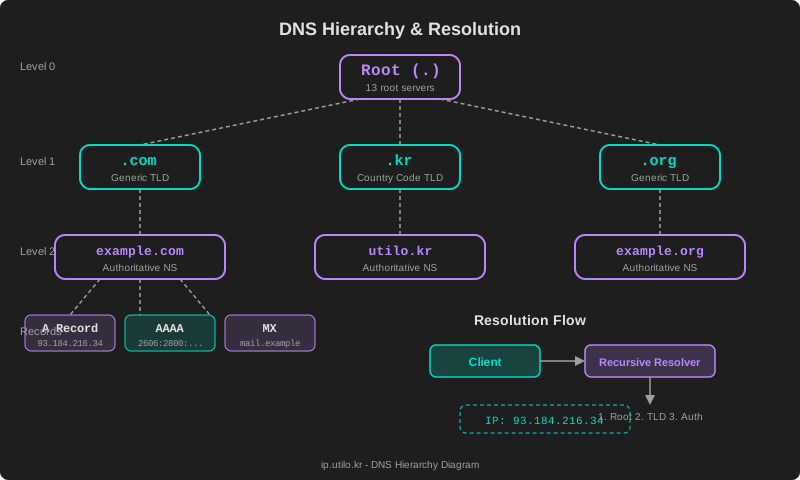
How DNS Works: Understanding the Internet's Phone Book
How DNS Works: Understanding the Internet’s Phone Book
When you type www.google.com into your browser, your computer doesn’t actually know where Google is. Computers communicate using IP addresses like 142.250.196.110, not human-readable names. The system that bridges this gap is the Domain Name System (DNS) — often called the internet’s phone book. DNS handles trillions of queries every day and is one of the most critical pieces of internet infrastructure.
In this guide, we’ll walk through the DNS hierarchy, query resolution process, caching mechanisms, and modern security protocols.
The DNS Hierarchy
DNS is designed as a distributed, hierarchical tree structure. Rather than storing all records in a single database, responsibility is divided across multiple layers of servers.
1. Root Name Servers
At the top of the DNS tree sit the root servers. There are 13 root server clusters (labeled A through M), operated by organizations including ICANN, Verisign, NASA, and the U.S. Army Research Lab. Through Anycast routing, these 13 logical servers are distributed across hundreds of physical locations worldwide.
Root servers don’t contain domain records directly. Instead, they point resolvers to the appropriate TLD servers.
. (root)
├── com.
├── kr.
├── org.
├── net.
└── ...
2. TLD Name Servers (Top-Level Domain)
One level below root, TLD servers manage domains within their top-level domain. They fall into several categories:
- Generic TLDs (gTLD):
.com,.org,.net,.info,.xyz - Country Code TLDs (ccTLD):
.kr(South Korea),.uk(United Kingdom),.jp(Japan) - New gTLDs:
.app,.dev,.blog— added since 2012
TLD servers respond with the addresses of the authoritative name servers for the queried domain.
3. Authoritative Name Servers
These servers hold the actual DNS records configured by domain administrators. They store and respond with A, AAAA, MX, CNAME, TXT, and other record types.
| Record Type | Purpose | Example |
|---|---|---|
| A | IPv4 address mapping | 93.184.216.34 |
| AAAA | IPv6 address mapping | 2606:2800:220:1:: |
| MX | Mail server | mail.example.com |
| CNAME | Alias | www → example.com |
| TXT | Text data (SPF, DKIM, etc.) | v=spf1 include:... |
| NS | Name server delegation | ns1.example.com |
Recursive vs. Iterative Queries
DNS uses two distinct query patterns to resolve domain names.
Recursive Queries
When your device sends a DNS query, it goes to a recursive resolver (also called a recursive DNS server). This resolver takes full responsibility for finding the answer, querying other servers on your behalf until it gets a final result.
The full resolution flow:
- User enters
www.example.comin the browser - The OS stub resolver sends a query to the recursive resolver
- Recursive resolver queries a root server → gets
.comTLD server address - Recursive resolver queries the TLD server → gets
example.comauthoritative NS address - Recursive resolver queries the authoritative NS → gets the final IP address
- Recursive resolver returns the result to the user
Your ISP typically runs recursive resolvers, though many users opt for public alternatives like Google (8.8.8.8) or Cloudflare (1.1.1.1).
Iterative Queries
This is how the recursive resolver communicates with each tier of the hierarchy. Rather than expecting a final answer, it receives referrals — each server responds with the best information it has, pointing the resolver to the next server in the chain.
DNS Caching and Propagation
TTL and Caching
Every DNS record includes a TTL (Time To Live) value, specified in seconds. This tells resolvers how long they can cache the record before requesting a fresh copy.
example.com.   3600   IN   A   93.184.216.34
                ↑ TTL = 3600 seconds (1 hour)
Caching happens at multiple layers:
- Browser cache: Chrome, Firefox, and other browsers maintain their own DNS cache
- OS cache: The operating system caches DNS responses (including
/etc/hosts) - Resolver cache: Your ISP or public DNS provider caches responses
- CDN/proxy cache: Services like Cloudflare may cache at the edge
DNS Propagation
When you update a DNS record, the change doesn’t take effect instantly worldwide. Cached copies of the old record persist until their TTL expires. This delay is called DNS propagation and can take anywhere from minutes to 48 hours.
Tips to reduce propagation time:
- Lower the TTL to 300–600 seconds before making changes
- Wait for the old TTL to expire, then make the change
- After propagation completes, restore the TTL to its normal value
- Use the DNS lookup tool to check propagation status across regions
Popular Public DNS Services
If you’re not running your own DNS infrastructure, public DNS services offer fast, reliable resolution with varying features.
| Service | Primary | Secondary | Key Feature |
|---|---|---|---|
| Google Public DNS | 8.8.8.8 | 8.8.4.4 | Fast, global Anycast |
| Cloudflare | 1.1.1.1 | 1.0.0.1 | Privacy-focused, fastest response |
| Quad9 | 9.9.9.9 | 149.112.112.112 | Automatic malware domain blocking |
| OpenDNS | 208.67.222.222 | 208.67.220.220 | Content filtering, parental controls |
Cloudflare’s 1.1.1.1 consistently ranks as the fastest public resolver in independent benchmarks, while Quad9 offers built-in threat protection by blocking known malicious domains.
DNS over HTTPS (DoH) and DNS over TLS (DoT)
Traditional DNS queries travel over UDP port 53 in plaintext. This means anyone on the network path — your ISP, a coffee shop Wi-Fi operator, or a government — can see which websites you’re visiting.
DNS over HTTPS (DoH)
DoH encrypts DNS queries inside standard HTTPS traffic on port 443. Because it’s indistinguishable from regular web traffic, it’s effective against both surveillance and censorship.
https://cloudflare-dns.com/dns-query?name=example.com&type=A- Browser support: Chrome, Firefox, Edge, Safari
- Advantages: Leverages existing HTTPS infrastructure, hard to block
- Trade-offs: Slight latency increase, centralization concerns
DNS over TLS (DoT)
DoT uses TLS encryption on a dedicated port (853). It’s clearly identifiable as DNS traffic, which makes it easier for network administrators to manage but also easier to block.
- Advantages: Clear protocol identification, easier network management
- Trade-offs: Port 853 can be blocked by firewalls
Both protocols effectively protect privacy and prevent man-in-the-middle attacks. Modern browsers and operating systems support DoH by default — check your settings to ensure it’s enabled.
DNSSEC Basics
DNSSEC (DNS Security Extensions) adds cryptographic verification to DNS responses. While DoH/DoT encrypt the transport, DNSSEC ensures the responses haven’t been tampered with — solving a different but equally important security problem.
How It Works
- Domain owners add digital signatures (RRSIG records) to their DNS records
- Resolvers verify these signatures using published public keys (DNSKEY records)
- A chain of trust extends from the root zone down to the queried domain
Key Record Types
- RRSIG: Digital signature for each record set
- DNSKEY: Public key used to verify signatures
- DS: Delegation Signer record — links a child zone to its parent
- NSEC/NSEC3: Authenticated denial of existence (proves a domain doesn’t exist)
DNSSEC is critical for preventing DNS cache poisoning attacks, where an attacker injects forged records into a resolver’s cache. However, adoption remains incomplete — not all domains have DNSSEC enabled, though major TLDs and many registrars now support it.
Troubleshooting DNS Issues
When things go wrong, these command-line tools are invaluable:
# Basic DNS lookup
nslookup example.com

# Detailed DNS query (recommended)
dig example.com A +short

# Query a specific DNS server
dig @8.8.8.8 example.com

# Trace the full resolution path
dig +trace example.com

# Reverse DNS lookup
dig -x 8.8.8.8

# Flush DNS cache on Windows
ipconfig /flushdns

# Flush DNS cache on macOS
sudo dscacheutil -flushcache
For a more convenient approach, try the DNS lookup tool on ip.utilo.kr. You can query various DNS record types directly from your browser without installing anything.
Wrapping Up
DNS is one of the most fundamental systems powering the internet. Its hierarchical, distributed design enables efficient management of billions of domains, while security extensions like DoH/DoT and DNSSEC continue to evolve to meet modern threats.
To learn more about performing DNS lookups in practice, check out our DNS lookup guide. If you want to inspect a domain’s DNS records right now, try the tool below.