Email Deliverability and IP Reputation: How to Avoid the Spam Folder
Email Deliverability and IP Reputation: How to Avoid the Spam Folder
You crafted the perfect marketing email, hit send, and… it landed in your customers’ spam folders. The problem might not be your content — it might be your IP reputation. Receiving mail servers check the sending server’s IP address and use its reputation history to decide whether your email reaches the inbox, gets quarantined, or is rejected outright. This guide covers everything you need to know about managing IP reputation for email deliverability.
How Mail Servers Verify Sending IPs
When an email arrives at a receiving server, it goes through a multi-step verification process.
Step 1: SMTP Connection Check
The receiving server first notes the sending server’s IP address from the SMTP connection.
Sending server IP: 203.0.113.10
Receiving server: "Got a connection from 203.0.113.10. Let's verify."
Step 2: Reverse DNS Lookup (PTR Record)
The server performs a reverse DNS lookup on the sending IP. If no PTR record exists or it doesn’t match the sending domain, trust decreases immediately.
203.0.113.10 → PTR → mail.example.com  ✓ (matches)
203.0.113.10 → PTR → (none)            ✗ (suspicious)
Step 3: Blacklist Check
The sending IP is checked against major spam blacklists — Spamhaus, Barracuda, SORBS, and others. A blacklisted IP will almost certainly see its email rejected or sent to spam.
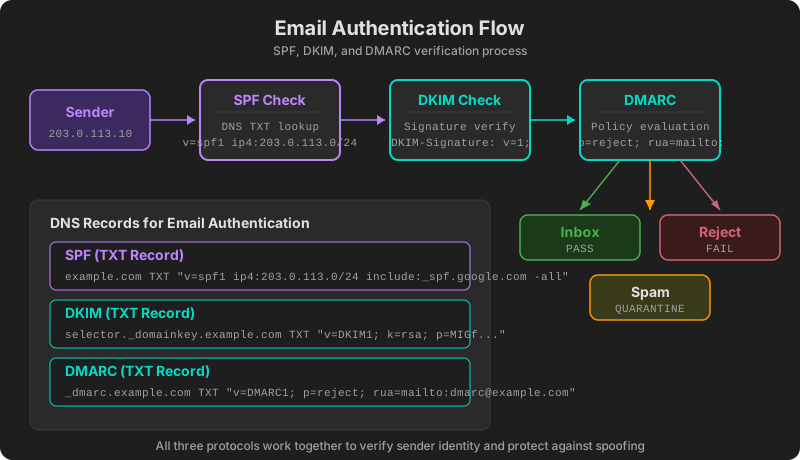
Step 4: Authentication Checks (SPF, DKIM, DMARC)
The three email authentication protocols are evaluated in sequence. Let’s examine each one.
SPF (Sender Policy Framework)
SPF lets domain owners publish a list of IP addresses authorized to send email on their behalf, stored as a DNS TXT record.
SPF Record Structure
example.com. IN TXT "v=spf1 ip4:203.0.113.0/24 include:_spf.google.com -all"| Element | Meaning |
|---|---|
v=spf1 | SPF version 1 |
ip4:203.0.113.0/24 | Allow sending from this IP range |
include:_spf.google.com | Also include Google’s SPF records |
-all | Reject all other IPs |
SPF Result Types
- Pass: Sending IP is listed in the SPF record
- Fail (-all): IP is not authorized — reject recommended
- SoftFail (~all): IP is not authorized — accept but mark as suspicious
- Neutral (?all): No assertion made
SPF Pitfalls
SPF has a 10 DNS lookup limit. Each include mechanism triggers additional lookups. If you use multiple email services (Google Workspace, Mailchimp, SendGrid, etc.), you can easily exceed this limit, causing SPF validation to fail entirely. Tools like SPF flattening can help, but they require maintenance.
DKIM (DomainKeys Identified Mail)
DKIM adds a cryptographic signature to outgoing emails, proving the message wasn’t tampered with in transit.
How It Works
- The sending server hashes the email headers and body
- The hash is signed with a private key and added to the email header
- The receiving server retrieves the public key from DNS
- The signature is verified to confirm message integrity
DKIM Signature Header
DKIM-Signature: v=1; a=rsa-sha256; c=relaxed/relaxed;
  d=example.com; s=selector1;
  h=from:to:subject:date;
  bh=base64encodedBodyHash;
  b=base64encodedSignature
DKIM DNS Record
selector1._domainkey.example.com. IN TXT "v=DKIM1; k=rsa; p=MIGfMA0GCS..."Unlike SPF, DKIM doesn’t depend on IP addresses. This means the signature remains valid even if the email is forwarded through intermediate servers — a significant advantage.
DMARC (Domain-based Message Authentication)
DMARC ties SPF and DKIM together into a unified policy framework. It tells receiving servers what to do when authentication fails and provides a reporting mechanism.
DMARC Record
_dmarc.example.com. IN TXT "v=DMARC1; p=reject; rua=mailto:dmarc-reports@example.com; pct=100"DMARC Policy Options
| Policy | Action | When to Use |
|---|---|---|
p=none | Take no action, collect reports only | Initial monitoring phase |
p=quarantine | Send to spam folder | Intermediate enforcement |
p=reject | Reject the email entirely | Full enforcement |
Recommended DMARC Rollout
If you’re setting up DMARC for the first time, take a phased approach:
p=none(2-4 weeks): Collect aggregate reports and fix SPF/DKIM issuesp=quarantine; pct=25: Quarantine 25% of failing messagesp=quarantine; pct=100: Quarantine all failing messagesp=reject: Full enforcement — unauthenticated messages are rejected
Jumping straight to p=reject without monitoring will almost certainly cause legitimate emails to bounce.
IP Warming
Sending a large volume of email from a brand-new IP address is one of the fastest ways to get flagged as spam. Receiving servers are inherently suspicious of IPs with no sending history.
Sample Warming Schedule
| Day | Daily Volume | Notes |
|---|---|---|
| 1-3 | 50-100 | Target your most engaged recipients |
| 4-7 | 200-500 | Gradually increase |
| Week 2 | 1,000-2,000 | Monitor bounce rates closely |
| Week 3 | 5,000-10,000 | Watch spam complaint rates |
| Week 4+ | Target volume | Stabilized |
Warming Best Practices
- Start with engaged recipients: Send to users who’ve recently opened or clicked your emails
- Keep bounce rate below 5%: Hard bounces damage reputation quickly
- Keep spam complaint rate below 0.1%: Gmail’s threshold for reputation damage
- Reduce volume immediately if problems arise: Don’t push through warnings
- Distribute across ISPs: Send to Gmail, Outlook, and Yahoo proportionally — don’t hammer one provider
Shared IP vs Dedicated IP
This is one of the most important infrastructure decisions for email senders.
Shared IP
Multiple senders share the same IP address, managed by the email service provider.
Pros:
- Lower cost
- No warming needed (existing sending history)
- Good for low-volume senders
Cons:
- Other senders’ spam behavior can tank your reputation
- Limited control over IP reputation
- “Noisy neighbor” problem
Dedicated IP
You get your own exclusive IP address for sending.
Pros:
- Full control over reputation
- Isolated from other senders
- Essential for high-volume sending
Cons:
- Higher cost
- Warming is mandatory
- Recommended only for 100,000+ emails per month
Decision Guide
| Condition | Recommendation |
|---|---|
| Monthly volume < 50,000 | Shared IP |
| Monthly volume > 100,000 | Dedicated IP |
| Transactional emails (auth codes, receipts) | Dedicated IP |
| Marketing emails (newsletters) | Depends on volume |
Monitoring IP Reputation
IP reputation isn’t a set-and-forget concern. It requires ongoing monitoring.
Monitoring Tools
- Google Postmaster Tools: See how Gmail classifies your emails, track domain and IP reputation
- Microsoft SNDS: Monitor delivery data for Outlook and Hotmail
- Blacklist checkers: Verify your IP isn’t listed on major spam databases
Key Metrics to Track
| Metric | Healthy | Caution | Critical |
|---|---|---|---|
| Bounce rate | < 2% | 2-5% | > 5% |
| Spam complaint rate | < 0.05% | 0.05-0.1% | > 0.1% |
| Blacklist listings | 0 | — | 1+ |
| Authentication pass rate | > 99% | 95-99% | < 95% |
When Things Go Wrong
If your IP gets blacklisted:
- Identify the cause: Spam sending, compromised server, misconfiguration, purchased list
- Fix the root issue: Remove the cause and strengthen security
- Request delisting: Follow each blacklist’s removal process (Spamhaus, Barracuda, etc.)
- Increase monitoring: Prevent recurrence with automated alerts
Pre-Send Checklist
Before hitting send on that email campaign:
- Is your SPF record correctly configured?
- Is DKIM signing enabled and verified?
- Is a DMARC policy in place?
- Does your PTR record match your sending domain?
- Is your sending IP clean on major blacklists?
- If it’s a new IP, have you completed warming?
- Are you monitoring bounce rates and spam complaints?
Tools for Email IP Management
Use ip.utilo.kr’s tools to keep your email infrastructure healthy:
- Blacklist Checker: Instantly check your sending IP against major spam blacklists. Catch problems before they affect deliverability.
- DNS Lookup: Verify that your SPF, DKIM, and DMARC records are correctly published and properly formatted.
- IP Lookup: Check your sending server’s IP details — location, ISP, ASN, and more.
Start by running your email server’s IP through the blacklist checker right now. A clean IP is the foundation of good deliverability.
Related posts: IP Blacklist Guide | Network Security Basics