Network Security Basics: What You Need to Know from an IP Perspective
Network Security Basics: What You Need to Know from an IP Perspective
Every device connected to the internet has an IP address, and that IP address sits at the heart of network security. Firewall rules filter by IP, intrusion detection systems track suspicious IPs, and DDoS attacks overwhelm target IPs with traffic. Understanding how IP addresses intersect with security is essential for any developer or system administrator. This guide covers the fundamentals.
Firewall Fundamentals
A firewall is the first line of defense in network security. It inspects incoming and outgoing traffic and enforces rules about what gets through.
Packet Filtering
The simplest firewall type. It examines each packet’s header — source IP, destination IP, port number, and protocol — and applies rules accordingly.
# iptables example: allow SSH from a specific IP
iptables -A INPUT -s 203.0.113.50 -p tcp --dport 22 -j ACCEPT

# Block SSH from all other sources
iptables -A INPUT -p tcp --dport 22 -j DROP

# Block an entire subnet
iptables -A INPUT -s 10.0.0.0/8 -j REJECT
Stateful Inspection
An evolution of packet filtering that tracks connection state. Instead of evaluating packets in isolation, it understands the context of a TCP session. Response packets for internally-initiated connections are automatically allowed, while unsolicited inbound connections are evaluated against rules.
# Allow packets from established connections
iptables -A INPUT -m state --state ESTABLISHED,RELATED -j ACCEPT

# Only allow new connections to specific ports
iptables -A INPUT -m state --state NEW -p tcp --dport 443 -j ACCEPT
Next-Generation Firewalls (NGFW)
Modern firewalls go beyond IP and port. They perform application-layer inspection, distinguishing between HTTPS traffic, VPN tunnels, and P2P file sharing — even when they all use port 443. They can also integrate threat intelligence feeds and sandboxing.
IP-Based Access Control
Whitelists and Blacklists
The two fundamental approaches to IP-based access control:
Whitelist (allow list): Only specified IPs can access the resource.
# Nginx configuration
location /admin {
    allow 203.0.113.50;
    allow 198.51.100.0/24;
    deny all;
}
Blacklist (block list): Specific IPs are denied access.
# Block known malicious IPs
deny 192.0.2.1;
deny 198.51.100.0/24;
Geo-Blocking
Using GeoIP databases to block traffic from specific countries. This can be effective when attack traffic is concentrated from certain regions.
# Block specific countries (with GeoIP module)
if ($geoip_country_code = "XX") {
    return 403;
}
Keep in mind that geo-blocking is easily bypassed with VPNs, so it should only be used as a supplementary measure.
Rate Limiting
Prevents any single IP from sending excessive requests:
# Nginx rate limiting
limit_req_zone $binary_remote_addr zone=api:10m rate=10r/s;

location /api/ {
    limit_req zone=api burst=20 nodelay;
}
Understanding Port Scanning
Port scanning is the practice of probing a target system to discover which ports are open and what services are running. Attackers use this as reconnaissance before launching targeted attacks.
Common Scan Types
| Scan Type | Description | Detection Difficulty |
|---|---|---|
| TCP Connect | Full TCP handshake | Easy |
| SYN Scan | Half-open scan (SYN only) | Medium |
| FIN Scan | Sends FIN packets | Hard |
| UDP Scan | Probes UDP ports | Very Hard |
Defending Against Port Scans
# Rate-limit connection attempts to detect scans (iptables)
iptables -A INPUT -p tcp --syn -m recent --name portscan --rcheck \
    --seconds 60 --hitcount 10 -j DROP
iptables -A INPUT -p tcp --syn -m recent --name portscan --set
The most effective defense is simple: close every port you don’t need and expose only the minimum required services.
DDoS Attacks Explained
A DDoS (Distributed Denial of Service) attack floods a target with traffic from many sources simultaneously, aiming to overwhelm the target’s capacity and make it unavailable to legitimate users.
Major DDoS Categories
Volumetric Attacks
- UDP floods, ICMP floods, DNS amplification
- Pure bandwidth exhaustion
- Can reach hundreds of Gbps
Protocol Attacks
- SYN Flood: exploits the TCP three-way handshake
- Ping of Death: malformed oversized ICMP packets
- Exhausts server connection-state resources
Application Layer Attacks (L7)
- HTTP Flood: massive numbers of HTTP requests
- Slowloris: holds connections open with partial requests
- Hardest to distinguish from legitimate traffic
DDoS Mitigation Strategies
- CDN/WAF services: Cloudflare, AWS Shield, Akamai absorb and filter traffic at the edge
- Traffic analysis: Real-time anomaly detection to identify attack patterns
- Anycast routing: Distribute traffic across multiple geographic points of presence
- IP reputation filtering: Pre-emptively block known malicious IPs
IP Spoofing
IP spoofing is the practice of forging the source IP address in a packet. Attackers use this to hide their identity or redirect responses to a victim.
Why Spoofing Is Dangerous
- Evasion: Hides the true origin of an attack
- Reflection attacks: Spoofed source IP causes responses to flood the victim instead of the attacker
- Authentication bypass: Can defeat IP-based access controls
Spoofing Defenses
# BCP38 (ingress filtering) - applied at the ISP level
# Drop packets with source IPs not belonging to this network
iptables -A FORWARD -s ! 203.0.113.0/24 -i eth0 -j DROP
uRPF (Unicast Reverse Path Forwarding): Routers verify that the source IP of each packet is reachable via the interface it arrived on. If not, the packet is likely spoofed and gets dropped.
Protecting Privacy with VPNs
A VPN (Virtual Private Network) encrypts your internet traffic and masks your real IP address — the most popular privacy tool available.
What a VPN Protects
- IP address masking: Websites see the VPN server’s IP, not yours
- Traffic encryption: Your ISP can’t inspect your traffic content
- Location bypass: Access geo-restricted content from anywhere
VPN Limitations
- Server logs: Some VPN providers retain connection logs
- DNS leaks: Misconfigured VPNs may expose DNS queries
- WebRTC leaks: Browser WebRTC can reveal your real IP
- VPN detection: Known VPN IP ranges can be identified and blocked
Want to know if your VPN is detectable? Try the VPN detection tool to find out.
Leveraging IP Utility Tools
Effective network security management requires the right tooling. Here’s how ip.utilo.kr’s tools can help:
Blacklist Monitoring
If your server’s IP lands on a spam blacklist, your emails get blocked and your reputation suffers. Use the blacklist checker regularly to verify your IPs are clean. For a deeper dive into how blacklists work, read our IP blacklist guide.
VPN and Proxy Detection
Detecting whether incoming traffic uses a VPN or proxy is essential for fraud prevention and security. The VPN detection tool identifies proxy, VPN, and Tor usage on any IP.
DNS Lookup
Verifying your domain’s DNS configuration is a security fundamental — SPF, DKIM, DMARC records, nameserver health, and more. Use the DNS lookup tool to inspect your records.
Security Checklist
A quick baseline security audit:
- Are unnecessary ports closed?
- Do firewall rules follow the principle of least privilege?
- Is your server IP clean on major blacklists?
- Is SSH access restricted to specific IPs?
- Is DDoS protection in place?
- Are DNS authentication records (SPF, DKIM, DMARC) correctly configured?
- Are logs being actively monitored?
Wrapping Up
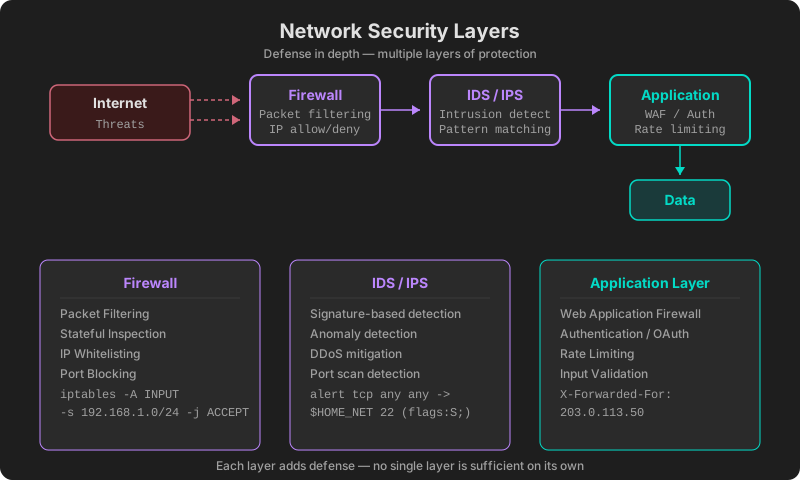
Network security isn’t a single solution — it’s a defense-in-depth strategy. Firewalls, IDS/IPS, application-layer security, and data encryption each address different threat vectors. No single layer is sufficient on its own; together, they create a resilient posture.
Start by checking your own security posture at ip.utilo.kr. Use the blacklist checker, VPN detection, and DNS lookup tools to get a baseline assessment of your network’s health.
Related posts: IP Blacklist Guide | VPN Detection Methods