IP Blacklist Check Guide: Find Out If Your IP Is Blocked
IP Blacklist Check Guide: Find Out If Your IP Is Blocked
Have you ever sent an email that never arrived, or found your web service being rejected by certain providers? One common culprit is IP blacklisting. When your server’s IP address lands on a blacklist, email delivery fails, service reliability drops, and your reputation takes a hit.
This guide covers everything you need to know about IP blacklists: what they are, why IPs get listed, how to check your status, how to get delisted, and how to prevent it from happening again.
What Is an IP Blacklist (DNSBL)?
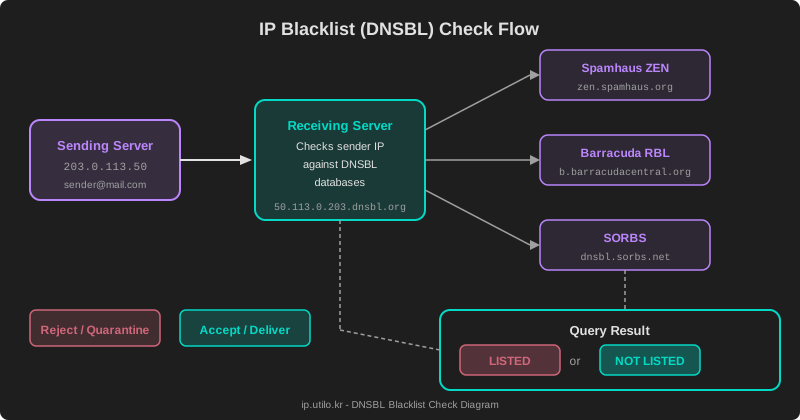
A DNSBL (DNS-based Blackhole List) is a database of IP addresses that have been reported for spam, malicious activity, or security threats. When a mail server receives an incoming message, it checks the sender’s IP against one or more DNSBLs. If the IP is listed, the server rejects the message or routes it to spam.
How It Works
DNSBL lookups cleverly leverage the DNS protocol. The IP address octets are reversed and appended to the blacklist domain:
# Checking IP 203.0.113.50 against Spamhaus
50.113.0.203.zen.spamhaus.org → A record response = LISTED
                               → NXDOMAIN = NOT LISTED
The response code indicates the reason for listing:
127.0.0.2— Spam source (SBL)127.0.0.3— Known spam source (SBL CSS)127.0.0.4— Exploited system (XBL)127.0.0.10–11— Policy-based block (PBL)
Why IPs Get Blacklisted
Getting blacklisted doesn’t always mean you’ve been sending spam intentionally. Several scenarios can trigger a listing.
1. Spam Email Delivery
The most obvious reason. Bulk marketing emails sent without proper consent, purchased mailing lists, or compromised accounts sending spam all lead to listings.
2. Server Compromise and Malware
If your server is hacked or infected with malware, attackers can use it as a spam relay. Tens of thousands of spam messages can be sent before you even notice. This is especially common with unpatched WordPress installations and outdated PHP applications.
3. Shared IP Reputation
On cloud hosting or shared servers, you share an IP address with other users. If one of those users sends spam, everyone on that IP suffers. This is a frequent problem on VPS and shared hosting platforms.
4. Missing Email Authentication
Without SPF, DKIM, and DMARC records, anyone can spoof your domain to send spam. The resulting complaints get attributed to your legitimate IP address.
5. Dynamic IP Ranges
Residential ISP IP ranges are typically listed on the PBL (Policy Block List) by default. This is a policy measure to prevent home connections from sending email directly — it’s not a punishment, but it means you can’t run a mail server from a residential connection without relay.
Major Blacklist Databases
Dozens of DNSBLs exist, but only a handful have significant impact on email deliverability.
Spamhaus
The most widely referenced blacklist in the world. Spamhaus operates multiple lists unified under their ZEN composite:
- SBL: Spamhaus Block List — verified spam sources
- XBL: Exploits Block List — hijacked/compromised IPs
- PBL: Policy Block List — IP ranges not intended for direct SMTP
A significant percentage of global mail servers consult Spamhaus.
- Lookup domain:
zen.spamhaus.org - Impact: Very high
- Removal: Self-service or manual request
Barracuda (BRBL)
Operated by Barracuda Networks, powered by their own spam traps and honeypot data.
- Lookup domain:
b.barracudacentral.org - Impact: High
- Removal: Web-based removal request
SORBS
The Spam and Open Relay Blocking System tracks open relays, open proxies, and spam origins.
- Lookup domain:
dnsbl.sorbs.net - Impact: Medium
- Removal: Web request (paid expedited option available)
SpamCop
A user-report-driven blacklist. When reports stop, IPs are automatically delisted within 24–48 hours.
- Lookup domain:
bl.spamcop.net - Impact: Medium–High
- Removal: Automatic (when reports cease)
Other Notable Blacklists
| Blacklist | Domain | Focus |
|---|---|---|
| UCEPROTECT | dnsbl-1.uceprotect.net | 3-tier escalation system |
| Composite BL | cbl.abuseat.org | Botnet/malware IP detection |
| JunkEmail | hostkarma.junkemailfilter.com | Reputation-based white/blacklist |
How to Check Your IP Blacklist Status
Command-Line Check
You can check directly from your terminal using dig or nslookup:
# Check IP 203.0.113.50 against Spamhaus
dig +short 50.113.0.203.zen.spamhaus.org

# A response means LISTED, NXDOMAIN means NOT LISTED
# 127.0.0.2 → SBL listing
# 127.0.0.4 → XBL listing
# 127.0.0.10 → PBL listing
Web-Based Tool
For a more convenient approach, use the blacklist check tool on ip.utilo.kr. Enter any IP address to instantly check its status across major DNSBLs in a single query.
How to Request Delisting
If you’ve confirmed your IP is blacklisted, follow these steps to get removed.
Step 1: Identify and Fix the Root Cause
This is critical. Requesting removal without fixing the underlying problem guarantees you’ll be relisted — often within hours. Common fixes include:
- Scan for and remove malware from your server
- Close open relay configurations
- Remove spam-sending scripts or compromised accounts
- Configure SPF, DKIM, and DMARC records
Step 2: Submit Removal Requests
Each blacklist has its own delisting process.
Spamhaus:
- Visit the Spamhaus Blocklist Removal Center
- Enter your IP to see listing details and reason
- After resolving the issue, complete the removal form
Barracuda:
- Go to Barracuda Central
- Look up your IP and click the removal request button
SpamCop:
- No action needed — SpamCop auto-delists within 24–48 hours after reports stop
Step 3: Monitor Continuously
After delisting, set up ongoing monitoring. Check your IP status regularly using the blacklist check tool, or configure automated alerts through your server monitoring platform.
Preventing Blacklist Listings
Prevention is far easier than remediation. Here’s how to protect your IP reputation proactively.
Configure Email Authentication
# SPF record example
v=spf1 ip4:203.0.113.50 include:_spf.google.com -all

# DMARC record example
v=DMARC1; p=quarantine; rua=mailto:dmarc@example.com
Set up all three: SPF, DKIM, and DMARC. These prevent domain spoofing and protect your sending reputation.
Harden Your Server
- Keep your OS and mail server software up to date
- Block unnecessary ports (especially port 25 outbound on non-mail servers)
- Enforce strong password policies
- Deploy intrusion prevention tools like Fail2Ban
Manage Your Mailing Lists
- Use double opt-in for all subscriptions
- Remove bouncing addresses immediately
- Include a clear, one-click unsubscribe link
- Warm up new IPs gradually instead of sending high volume immediately
Use a Dedicated IP
If you send significant email volume, use a dedicated IP rather than shared hosting. This isolates your reputation from other users and gives you full control over your sending practices.
Wrapping Up
IP blacklists are an essential defense mechanism that protects the internet ecosystem from spam and malicious traffic. But legitimate servers can get caught too, making regular monitoring and proactive prevention crucial.
To learn more about the relationship between email delivery and IP reputation, read our guide on email deliverability and IP reputation.
Check whether your IP is currently blacklisted right now.