What Is Whois? How to Look Up IP and Domain Ownership
What Is Whois? How to Look Up IP and Domain Ownership
Ever wondered who owns a particular domain or IP address? Whether you’re investigating a suspicious email, checking domain registration status, or finding the abuse contact for a misbehaving network, Whois lookup is the tool for the job.
This guide covers the Whois protocol, its modern successor RDAP, how to interpret results, privacy considerations under GDPR, and practical use cases for network professionals and everyday users alike.
The Whois Protocol
Whois is a query/response protocol used to look up registration information for internet resources — domain names, IP addresses, and Autonomous System (AS) numbers. First defined in RFC 812 back in 1982, it has served as a cornerstone of internet governance for over four decades.
How It Works
A Whois client sends a query over TCP port 43 to a Whois server, which returns registration data in plain text format.
# Domain Whois lookup
whois google.com

# IP address Whois lookup
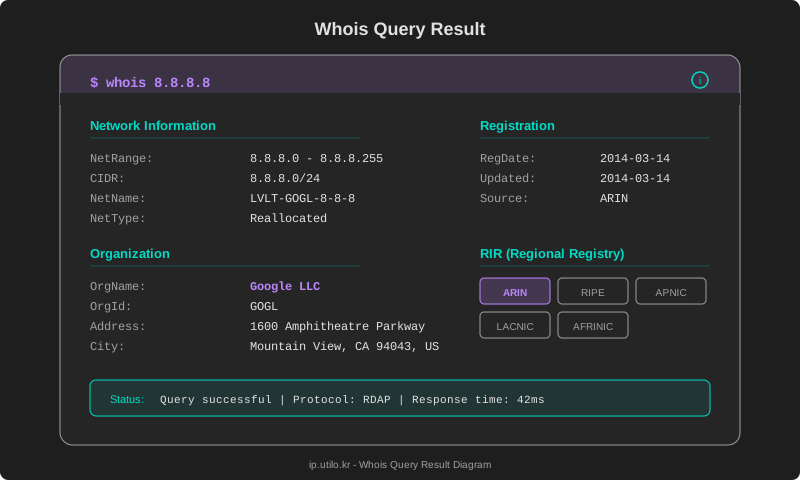
whois 8.8.8.8
The Whois Server Hierarchy
Whois servers operate in a hierarchical structure:
- IANA: Top-level Whois server, redirects to the appropriate lower-level server
- RIRs (Regional Internet Registries): Manage IP address allocations
- ARIN (North America), RIPE NCC (Europe), APNIC (Asia-Pacific), LACNIC (Latin America), AFRINIC (Africa)
- Registries: Operate TLD-specific Whois servers (e.g., Verisign for
.com) - Registrars: Domain registrar-specific Whois (e.g., GoDaddy, Namecheap, Cloudflare)
RDAP: The Successor to Whois
RDAP (Registration Data Access Protocol) is the next-generation replacement for Whois, designed to address its limitations. Standardized in 2015 through RFCs 7480–7484, ICANN has mandated RDAP support for all gTLD registries and registrars as of 2024.
Whois vs. RDAP Comparison
| Feature | Whois | RDAP |
|---|---|---|
| Protocol | TCP port 43 (text) | HTTPS (JSON) |
| Response format | Unstructured text | Structured JSON |
| Authentication | None | OAuth and others |
| Internationalization | Limited | Full Unicode support |
| Access control | None | Role-based access |
| Bootstrap | Manual server selection | Automatic server discovery |
| Status | Legacy | Current standard |
RDAP’s biggest advantage is structured JSON responses, making programmatic parsing straightforward:
{
  "objectClassName": "ip network",
  "handle": "8.8.8.0 - 8.8.8.255",
  "name": "LVLT-GOGL-8-8-8",
  "type": "ALLOCATION",
  "entities": [{
    "objectClassName": "entity",
    "handle": "GOGL",
    "vcardArray": ["vcard", [
      ["fn", {}, "text", "Google LLC"]
    ]]
  }]
}
What Information Can You Find?
Domain Whois Data
A domain Whois lookup can reveal:
- Registrant: Domain owner name and organization
- Admin Contact: Administrative point of contact
- Tech Contact: Technical point of contact
- Registrar: The company where the domain was registered
- Creation Date: When the domain was first registered
- Expiration Date: When the registration expires
- Name Servers: The domain’s DNS servers
- Status: Current domain status codes
IP Address Whois Data
IP Whois provides different information:
- NetRange/inetnum: The IP address range
- CIDR: Network in CIDR notation
- NetName: Network identifier
- OrgName: Organization that holds the allocation
- OrgId: Organization identifier
- RegDate: Date of allocation
- Updated: Last modification date
- Contact information: Abuse, NOC, and Tech contacts
NetRange:       8.8.8.0 - 8.8.8.255
CIDR:           8.8.8.0/24
NetName:        LVLT-GOGL-8-8-8
OrgName:        Google LLC
OrgId:          GOGL
RegDate:        2014-03-14
Updated:        2014-03-14
Ref:            https://rdap.arin.net/registry/ip/8.8.8.0
Reading Whois Results
Domain Status Codes (EPP)
The status field in Whois results uses EPP (Extensible Provisioning Protocol) status codes, which are often confusing to newcomers.
| Status Code | Meaning |
|---|---|
clientDeleteProhibited | Registrar prevents deletion |
clientTransferProhibited | Registrar prevents transfer |
clientUpdateProhibited | Registrar prevents record changes |
serverDeleteProhibited | Registry prevents deletion |
serverTransferProhibited | Registry prevents transfer |
redemptionPeriod | Domain deleted, in 30-day recovery window |
pendingDelete | Final deletion in 5 days |
active / ok | Normal, no restrictions |
When clientDeleteProhibited, clientTransferProhibited, and clientUpdateProhibited are all present, it indicates domain lock is active — a security measure against unauthorized changes or hijacking.
RIR Coverage Areas
IP address lookups return results from different Whois servers depending on which RIR manages that address block:
| RIR | Region | Whois Server |
|---|---|---|
| ARIN | North America, Caribbean | whois.arin.net |
| RIPE NCC | Europe, Middle East, Central Asia | whois.ripe.net |
| APNIC | Asia-Pacific | whois.apnic.net |
| LACNIC | Latin America | whois.lacnic.net |
| AFRINIC | Africa | whois.afrinic.net |
GDPR and Whois Privacy
The EU’s General Data Protection Regulation (GDPR), effective since May 2018, fundamentally changed Whois data availability.
What Changed
- Personal registrant data is redacted: Names, addresses, phone numbers, and email addresses of individual registrants are no longer publicly visible
- “Redacted for Privacy”: Personal information fields display this placeholder
- Default privacy protection: Most registrars now enable privacy services by default
Registrant Name: REDACTED FOR PRIVACY
Registrant Organization:
Registrant Street: REDACTED FOR PRIVACY
Registrant City: REDACTED FOR PRIVACY
Registrant Phone: REDACTED FOR PRIVACY
Registrant Email: Please query the RDDS service of the Registrar
Legitimate Access
Law enforcement, cybersecurity researchers, and intellectual property rights holders can request access to redacted data through RDAP’s authenticated access mechanisms. However, this requires following ICANN’s SSAD (System for Standardized Access/Disclosure) framework — it’s not instant or guaranteed.
Impact on Security Research
The loss of public Whois data has complicated threat intelligence work. Researchers can no longer trivially correlate malicious domains through shared registrant information. RDAP’s role-based access was designed to address this, but adoption of the disclosure process has been slow.
Practical Use Cases
1. Cybersecurity Investigation
Look up suspicious IPs or domains to identify owners, registration dates, and network information. Recently registered domains (Creation Date within the last few days) are often indicators of phishing or malware campaigns.
2. Domain Trading and Disputes
Identify domain owners for acquisition inquiries, or monitor expiring domains. Whois records serve as evidence in trademark disputes filed through the UDRP (Uniform Domain-Name Dispute-Resolution Policy).
3. Network Troubleshooting
When you’re receiving spam, DDoS traffic, or abuse from a specific IP, Whois reveals the Abuse Contact to file reports:
# Find abuse contact
whois -h whois.arin.net 8.8.8.8 | grep -i abuse
# OrgAbuseEmail: network-abuse@google.com
4. Competitive Intelligence
Research a competitor’s hosting provider, name servers, and domain registration history to understand their technical infrastructure choices.
5. Supplementing GeoIP Data
Whois organization names and addresses can be combined with GeoIP data to improve IP geolocation accuracy, particularly for identifying the actual organization behind an IP address.
How to Perform Whois Lookups
Command-Line Tools
Most operating systems include a built-in whois command:
# Domain Whois
whois example.com

# IP Whois
whois 1.1.1.1

# Specify a Whois server
whois -h whois.apnic.net 203.0.113.1

# .kr domain
whois -h whois.kr utilo.kr
RDAP Queries
Since RDAP is HTTP-based, you can query it with curl:
# IP lookup via RDAP
curl -s https://rdap.arin.net/registry/ip/8.8.8.8 | jq .

# Domain lookup via RDAP
curl -s https://rdap.verisign.com/com/v1/domain/google.com | jq .
Web-Based Tool
For a quick lookup without a terminal, use the Whois lookup tool on ip.utilo.kr. Enter any IP address or domain name to see registration details in a clean, readable format.
Frequently Asked Questions
Q: Are there rate limits on Whois queries?
Yes. Most Whois servers enforce rate limits to prevent abuse. Excessive queries in a short period will result in temporary blocks. RDAP servers have similar limits. If you’re building automated tools, implement appropriate delays between queries.
Q: What happens if Whois information is inaccurate?
Under ICANN policy, gTLD domain registrants must maintain accurate Whois data. Registrars send annual WDRP (Whois Data Reminder Policy) notices. Failure to respond or maintain accurate information can result in domain suspension.
Q: Can I see redacted Whois information?
If privacy protection is enabled, the actual registrant details are not available to the general public. Access requires a legitimate legal basis and a formal request through the registrar or ICANN’s disclosure process.
Wrapping Up
Whois is a foundational tool for internet transparency. It serves domain management, security investigation, network troubleshooting, and countless other use cases. As the ecosystem transitions to RDAP, lookups are becoming more structured, secure, and privacy-aware.
To learn more about how IP geolocation data complements Whois, check out our analysis of IP geolocation accuracy.
Look up the registration details of any IP or domain right now.